
Enhanced Review of GMass.co: An Indispensable Tool for Recruiters and Sourcers

In the competitive world of recruitment and sourcing, professionals continually seek out innovative tools to streamline their workflows and enhance efficiency. GMass.co, a powerful email automation tool integrated with Gmail, stands out in this regard. This comprehensive review delves deeper into its functionalities, specifically focusing on how it can benefit recruitment and sourcing activities, along with its pricing structure.
Core Functionalities of GMass.co
Break Gmail’s Sending Limits
GMass allows users to surpass the usual sending limits of Gmail, which is particularly advantageous for recruiters managing large-scale email campaigns.
Seamless Google Sheets Integration
Users can easily connect their email lists in Google Sheets with GMass, facilitating personalized and targeted email campaigns.
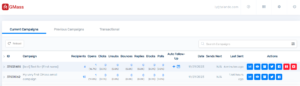
Detailed Campaign Analytics
GMass provides in-depth analytics on email opens, clicks, and responses, which are crucial for recruiters to evaluate the effectiveness of their outreach strategies.
Advanced Personalization
Recruiters can personalize emails at scale, adding a personal touch to mass email campaigns. This feature enhances engagement and response rates from candidates.
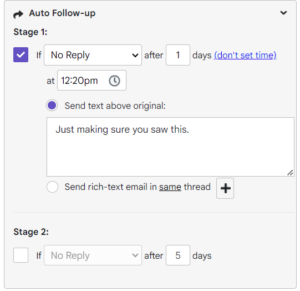
Automated Follow-Up Emails
GMass automates follow-up emails based on various triggers like email opens or clicks, ensuring consistent engagement without manual intervention.
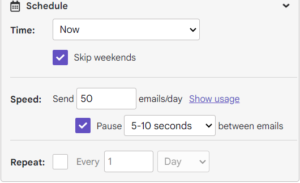
Email Scheduling
Users can schedule emails to be sent at optimal times, enhancing the chances of emails being read and responded to promptly.
Email Polling and Sending as Replies
Recruiters can create polls within emails and send emails as part of a thread, which is useful for maintaining continuity in communication.
Segmented Campaigns
This feature allows for the creation of targeted campaigns based on different criteria, ensuring that messages are relevant to specific groups of candidates or clients.
Reply Management
Managing responses becomes more manageable with GMass, helping recruiters keep track of candidate interactions efficiently.
Unsubscribe and Bounce Management
These features help in maintaining email list hygiene, ensuring compliance with email marketing best practices.
Unique Features and Products
GMass Chrome Extension
This extension integrates GMass functionalities directly into the Gmail interface, making it user-friendly and accessible.
Inbox, Spam, and Promotion Categorization
GMass helps in understanding where emails land – inbox, spam, or promotions, aiding in improving email deliverability.
Email Verifier
This tool verifies email lists before sending, reducing the risk of sending to invalid or fake email addresses.
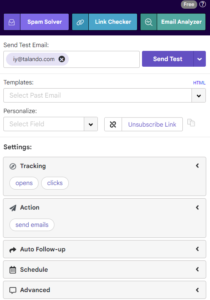
Email and SMTP Testers
GMass offers tools for testing emails for various authentication standards and SMTP connection testing, ensuring high deliverability.
Additional Tools
GMass provides a variety of tools like domain statistics, link checkers, deliverability parts, tracker blockers, and reply project management.
Applications in Recruitment and Sourcing
Broad Applications: GMass can be used for various outreach activities, including membership outreach, press releases, and more, demonstrating its versatility.
Recruitment-Specific Outreach: It is particularly effective for job outreach, candidate follow-up, and maintaining continuous communication with potential hires.
Pricing Structure
GMass offers a tiered pricing structure, catering to different levels of usage and feature needs:
Free Plan: Offers limited functionality, suitable for trying out basic features and only up to 50 emails per day.
Standard Plan: Includes most features but limits some advanced functionalities like automated follow-up sequences.
Premium Plan: Provides full access to all features, including advanced personalization and automated sequences. Ideal for heavy users or larger recruitment teams.
Enterprise Plan: Tailored for large organizations with specific needs, offering custom solutions and support.
Key Advantages of GMass
Simplicity
GMass’s user interface is straightforward, making it easy for users to navigate and utilize its features without a steep learning curve.
Effective Free Version
The free version of GMass allows users to send up to 50 emails per day, making it a practical option for small-scale recruitment campaigns or individual recruiters.
Personalized Email Campaigns
Despite its simplicity, GMass effectively facilitates personalized email outreach, which is crucial in building and maintaining candidate relationships.
Google Sheets Integration
The unique integration with Google Sheets for uploading contacts, as opposed to the typical CSV format, can be seen as a streamlined approach for those who regularly use Google Workspace.
Limitations of GMass
Lack of Advanced Features
GMass is quite basic in its functionality, lacking advanced AI integration or pre-built templates that could accelerate the email creation process.
Limited Design and Aesthetics
The tool’s design is minimalistic and might seem underwhelming for users accustomed to more sophisticated interfaces and functionalities.
Dependency on Gmail
Being a Chrome extension for Gmail, its usage is limited to those who primarily use Gmail for their email communications.
Limited Free Version Capabilities
While the free version is useful, it’s limited to 50 emails per day, which might not be sufficient for larger recruitment drives.
Conclusion
GMass.co is a simple yet effective tool for recruiters and sourcers who value straightforward functionality over complex features. Its ease of use, coupled with the efficiency of personalized email campaigns, makes it a viable option for professionals in the recruitment sector. However, for those accustomed to more elaborate designs and advanced functionalities, GMass might come across as basic or unexciting. Ultimately, GMass serves as a practical tool for achieving recruitment goals, particularly for those who prioritize function over form.
